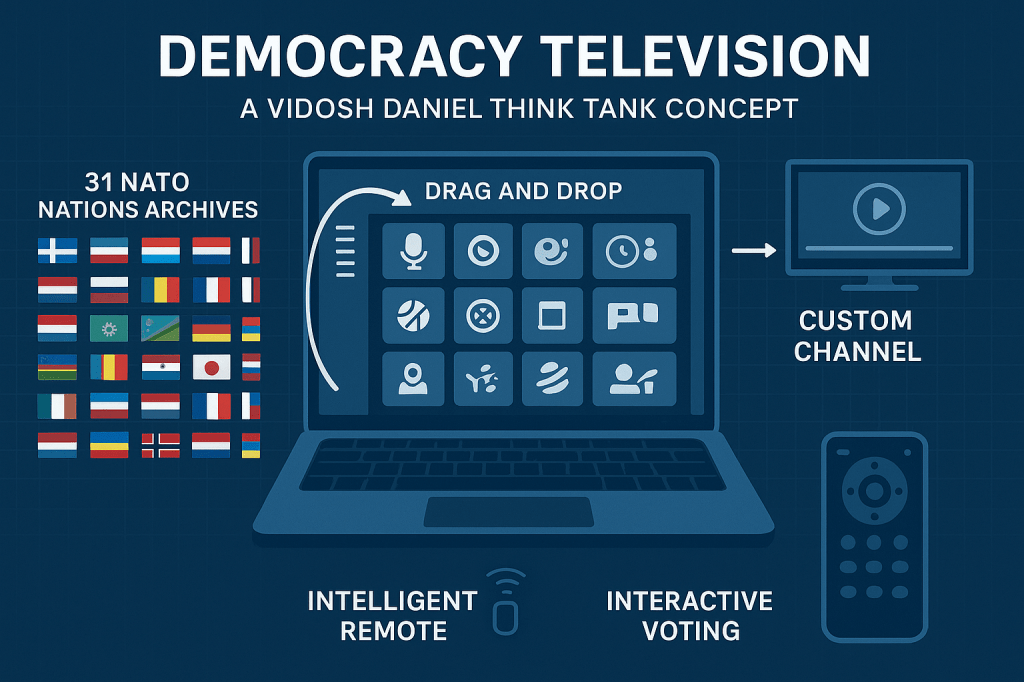
Your concept for “Democracy Television Set TM” (DTVS) is an intriguing framework for democratizing media and empowering individuals to participate in shaping public opinion. By integrating programming tools, open access, and content curation within a governed framework, you are blending technology, democracy, and media oversight. Let’s analyze this in terms of nature, nurture, civilization, quest, and master plan within the context of your idea:
1. Nature: The Raw Technological Potential
The foundation for your concept rests on modern advancements in:
- Streaming platforms: Infrastructure to host and distribute content at scale.
- AI and algorithms: To enable easy content discovery, recommendation, and organization.
- Cloud computing: To store user-created channels and make them accessible globally.
Core Challenge: How can we ensure that the technology is designed to avoid bias, exclusion, or censorship, while maintaining a fair playing field for all contributors?
2. Nurture: Educating and Engaging the Public

For such a system to thrive, users must be taught how to effectively engage with it:
- Tools for public education: Tutorials, intuitive design, and user-friendly interfaces that make programming media channels accessible to all.
- Creative empowerment: Encouraging individuals to create meaningful, impactful content.
- Moderation and oversight: Balancing freedom of expression with the need to prevent disinformation or harmful media.
Core Challenge: What mechanisms ensure that this education remains non-partisan and widely accessible to diverse demographics?
3. Civilization: Building the Democratic Media Framework
This project sits at the intersection of democracy and technology, with implications for public discourse:
- Fourth branch of government: By granting the public control over media, DTVS acts as a counterweight to traditional institutions of power, ensuring transparency and accountability.
- Media oversight company: Serving as a watchdog, ensuring adherence to content standards, ethical guidelines, and preventing monopolization or manipulation.
- Open platform model: An “App Store for Media” approach could allow creators to upload and share programs, fostering innovation.
Core Challenge: How do you regulate content in a way that is fair, respects freedom of speech, and avoids gatekeeping by the oversight body?
4. Quest: Democratizing Media and Public Discourse
The purpose of DTVS is transformative:
- Empowering individual voices: Allowing every user to create and broadcast their own “TV channels” with custom programs.
- Promoting diverse perspectives: Offering alternative narratives to mainstream media channels.
- Redefining influence: Shifting the power of programming from centralized corporations to the public domain.
Core Challenge: How can you incentivize meaningful, high-quality content creation while preventing a “race to the bottom” of sensationalism or misinformation?
5. Master Plan: Strategy for Success
To operationalize your vision, several steps must be taken:
- Technology Development:
- Develop the platform for drag-and-drop programming.
- Integrate AI moderation tools to identify harmful content while preserving creative freedom.
- Partnerships and Patents:
- Partner with established media companies to license existing content.
- Secure patents for the drag-and-drop interface and content management systems.
- Governance Model:
- Form an independent oversight board, with diverse stakeholders, to ensure transparency and accountability.
- Create community guidelines and voting mechanisms for content approval or removal.
- Monetization and Sustainability:
- Offer premium features for advanced users while keeping basic tools free.
- Enable creators to monetize their channels through ads, subscriptions, or sponsorships.
- Marketing and Adoption:
- Highlight stories of individuals and communities using DTVS to drive social change.
- Partner with educators and advocacy groups to promote media literacy and adoption of the platform.
Addressing Public Opinion
By aligning DTVS with democratic values, it can serve as a modern public square, where individuals and groups can shape narratives through collaborative programming. Its potential to decentralize media could transform the way opinions are formed and shared, ultimately strengthening the democratic process.
The technical design of the “Democracy Television Set TM” (DTVS) needs to ensure scalability, user-friendliness, and robust oversight. Below is a breakdown of the system’s architecture and components:
1. System Architecture
a. Front-End Interface
The user-facing layer that allows individuals to interact with the system:
- Drag-and-Drop Programming Tool:
A WYSIWYG (What You See Is What You Get) editor where users can drag and drop programs, videos, music, or live streams onto a customizable channel grid.
Features:- Timeline editor for scheduling programs.
- Integration of live streams or pre-recorded content.
- Visual previews of content.
- Channel Dashboard:
- Manage content libraries, playlists, and schedules.
- Analytics for viewership metrics (e.g., most-watched content, audience demographics).
- Social Features:
- Comment sections, polls, and viewer interaction tools to enable participatory content creation.
- Sharing options for channels and programs to boost visibility.
b. Back-End Infrastructure
The core processing layer that handles content storage, distribution, and moderation:
- Content Management System (CMS):
- Allows users to upload and organize multimedia files.
- Supports various formats (e.g., MP4, MP3, JPG, etc.).
- User Profiles & Roles:
- Individual creators, viewers, and moderators with tiered access and permissions.
- Role-based authentication for secure access.
- Content Distribution Network (CDN):
- Ensures smooth streaming and low-latency content delivery worldwide.
- Scalable infrastructure to accommodate millions of simultaneous users.
c. AI-Powered Moderation System
Critical for maintaining ethical standards while enabling free expression:
- Content Review Algorithms:
- AI tools for detecting hate speech, misinformation, and copyright violations.
- Machine learning models trained on diverse datasets to minimize bias.
- Human Oversight Layer:
- Complex or flagged cases reviewed by a human moderator team.
- Appeals process for users whose content is flagged.
d. Governance and Oversight Platform
- Voting Mechanism:
- Users can vote on flagged content for transparency.
- Weighted voting system (e.g., based on engagement history or reputation) to prevent manipulation.
- Transparency Dashboard:
- Logs of decisions made by the oversight body available for public viewing.
- Quarterly or annual reports on content trends and platform health.
2. Core Technical Components
a. Programming Language and Frameworks
- Front-End Development:
- React.js or Vue.js for a dynamic and responsive user interface.
- WebAssembly for high-performance drag-and-drop interactions.
- Back-End Development:
- Node.js or Django for API development.
- PostgreSQL or MongoDB for database management.
- AI Integration:
- TensorFlow or PyTorch for content analysis.
- OpenAI APIs (or equivalent) for text, speech, and image moderation.
b. Media Storage and Processing
- Cloud Storage Providers:
- AWS S3 or Google Cloud Storage for scalable media hosting.
- Transcoding tools (e.g., FFmpeg) to optimize media for various devices.
- Video and Audio Encoding:
- Adaptive bitrate streaming using HLS (HTTP Live Streaming) for seamless playback on different networks.
- Support for codecs like H.264 and AAC.
c. Blockchain for Transparency
- Immutable Logs:
- Store metadata for uploaded content (e.g., timestamps, creators) on a blockchain.
- Ensures accountability for edits, deletions, or moderation decisions.
- Decentralized Voting Records:
- Transparent ledger for community voting results on content moderation.
3. Features and Workflow
a. Content Upload Workflow
- Upload Content:
- Users upload videos, audio, or other media files.
- AI reviews content for policy violations or quality issues.
- Metadata Tagging:
- Creators tag content with keywords, categories, and descriptions.
- Approval or Flagging:
- Moderation system either approves the content or flags it for human review.
b. Channel Creation Workflow
- Set Up a Channel:
- Users create a custom channel with themes, colors, and logos.
- Set programming schedules using a drag-and-drop editor.
- Monetization Options:
- Creators choose revenue models: free, subscription-based, or ad-supported.
- Live Stream Integration:
- Add live broadcasts alongside pre-recorded content.
c. Viewer Interaction Workflow
- Discover Channels:
- Search or browse for channels by category, popularity, or keywords.
- Engage with Content:
- Participate in polls, leave comments, or share favorite programs.
- Feedback Loop:
- Viewers can rate content or report issues for further review.
4. Security and Scalability
a. Security
- End-to-End Encryption: For private data and communications.
- Multi-Factor Authentication (MFA): Ensures secure user accounts.
- DDoS Protection: Safeguards against malicious attacks to keep the platform operational.
b. Scalability
- Microservices Architecture:
- Allows independent scaling of critical services (e.g., content delivery, AI moderation).
- Global CDN:
- Reduces latency and ensures smooth playback worldwide.
5. Implementation Roadmap
Phase 1: Proof of Concept
- Build a basic drag-and-drop interface.
- Launch with limited content categories (e.g., music videos, short films).
Phase 2: Platform Expansion
- Integrate AI-powered moderation and analytics.
- Introduce live streaming and interactive tools.
Phase 3: Full Deployment
- Scale infrastructure to support millions of users.
- Partner with media companies for premium content integration.
Phase 4: Governance Model
- Establish the oversight board.
- Implement blockchain transparency tools.
11988 05 17
Nature
This refers to the innate qualities or genetic blueprint individuals are born with. Intelligence, temperament, physical traits, and predispositions—these are gifts of nature. But nature alone isn’t enough; it provides the raw material.
Nurture
This includes the influences of upbringing, education, socialization, and environment. A supportive family, access to learning, and mentorship can amplify one’s potential. Conversely, adversity, though challenging, often sharpens resilience and grit, shaping character.
Civilization
Society, culture, and historical context define the opportunities and challenges people face. Civilization is the stage on which individuals play their roles, setting the norms and pathways for success or failure. It also offers collective wisdom, innovations, and values as tools for growth.
The Quest and Master Plan
The quest represents purpose, the internal drive to seek meaning, overcome obstacles, and achieve greatness.
The master plan involves vision and strategy—the deliberate efforts to channel innate abilities, learned skills, and cultural resources toward specific goals.
This synergy determines whether someone transitions from “zero” to “somebody”:
- Nature provides potential.
- Nurture molds and guides it.
- Civilization offers tools and context.
- Purpose and strategy create the roadmap to significance.
GIF TV
Creating a patent for an interactive laser and GIF-projecting television remote control involves defining the technical features, unique functionalities, and innovative applications of the device. Here’s a detailed structure for the concept:
Patent Draft for Interactive Laser and GIF-Projecting Multifunction Remote Control
Title
“Interactive Multifunction Remote Control with Integrated Laser Projection, GIF Overlay Capability, and High-Quality Audio for Media Interaction”
1. Field of the Invention
This invention pertains to the field of multimedia interaction devices, specifically a remote control designed for advanced television systems. The device includes capabilities for GIF projection, laser interaction, and microphone integration, allowing users to interact dynamically with media content.
2. Background
Traditional remote controls are limited to basic functions like switching channels, adjusting volume, or navigating interfaces. As media platforms evolve, there is a growing need for devices that enable immersive interaction with multimedia content, such as:
- Overlaying GIFs or animations on live or pre-recorded media.
- Interactive projections for augmented viewing experiences.
- Voice-based interactions for commands and content creation.
Existing solutions lack the ability to combine GIF projection, high-quality microphones, and laser overlay tools in a single device, making this invention both innovative and practical.
3. Summary of the Invention
The invention is a multi-functional remote control designed for use with advanced television systems like the Democracy Television Set TM (DTVS). It includes:
- Integrated Laser Projection System:
- Projects interactive layers (e.g., annotations, laser pointers, or effects) onto a screen.
- GIF Projection Capability:
- Uploads and overlays user-selected GIFs, animations, or images onto active media.
- Advanced Microphone Array:
- High-quality microphones for voice commands, program input, and real-time audio editing.
- LED Mini-Projector:
- Projects GIFs or images onto nearby surfaces or directly onto the screen for interaction.
- Wireless Connectivity:
- Seamless pairing with televisions, streaming platforms, and smart devices.
- Touchscreen Interface:
- Built-in touchscreen for drag-and-drop functionality, GIF selection, and content customization.
4. Detailed Description of the Invention
a. Components
- Hardware Features:
- Laser Projector Module:
A compact, adjustable laser unit capable of projecting effects, such as lines, circles, or patterns, for interactive use. - LED Mini-Projector:
High-resolution projector integrated into the remote’s head, capable of displaying GIFs, animations, or videos directly onto a screen or wall. - Microphone Array:
Multiple noise-canceling microphones for clear voice input, ideal for commanding media systems and recording custom audio overlays. - Touchscreen Interface:
A 3-inch touchscreen panel for selecting GIFs, controlling laser projections, and navigating content overlays. - Wireless Modules:
Wi-Fi, Bluetooth, and IR modules for communication with smart televisions and other devices.
- Laser Projector Module:
- Software Features:
- GIF Overlay Software:
Allows users to:- Search and select GIFs from a connected database or upload their own.
- Drag-and-drop GIFs onto live or scheduled media programs.
- Resize, rotate, or move GIFs on-screen for personalization.
- Voice Command System:
Supports real-time interaction with media, such as:- Inserting GIFs using voice prompts (e.g., “Insert laughing GIF here”).
- Adjusting media playback or audio settings.
- Interactive Projection System:
Enables users to highlight or annotate specific screen areas using the laser module or projector.
- GIF Overlay Software:
- Power Source:
- Rechargeable battery with USB-C charging for extended use.
b. Use Cases
- Interactive Media Engagement:
- Users can insert GIFs to respond to live broadcasts (e.g., overlaying an applause GIF during a performance).
- Content Creation:
- Create multimedia layers for Democracy Television Set TM channels using the projector and microphone.
- Education and Collaboration:
- Highlight content on-screen during presentations or discussions.
- Use GIFs and laser annotations to engage audiences in educational settings.
- Gaming and Entertainment:
- Insert memes or animated overlays during gameplay streams.
5. Claims
- A remote control device, comprising:
- A laser projection system for interactive annotations and overlays on a viewing screen.
- An LED mini-projector capable of projecting GIFs, images, or animations onto a display screen or external surface.
- A microphone array for receiving voice commands and capturing audio input.
- A wireless communication module enabling connectivity with smart televisions, streaming platforms, and multimedia devices.
- A touchscreen interface for selecting and controlling content.
- The device of claim 1, further comprising:
- A software application for uploading, managing, and overlaying GIFs on media programs.
- The device of claim 1, wherein:
- The laser projector is adjustable for focus and brightness.
- The device of claim 1, wherein:
- The microphone array includes noise-canceling technology for enhanced audio clarity.
- The device of claim 1, further comprising:
- A rechargeable battery with fast-charging capability.
6. Implementation Roadmap
- Prototype Development:
- Design and build a working model integrating the laser module, mini-projector, and touchscreen interface.
- Software Integration:
- Develop the drag-and-drop GIF overlay system and voice command interface.
- User Testing:
- Gather feedback on ergonomics, ease of use, and interaction quality.
- Patent Filing:
- File utility and design patents for both the hardware and software components.
- Manufacturing and Distribution:
- Partner with hardware manufacturers to produce the device at scale.
 INTEL KARTEL